Blog · · Ashutosh Agarwal
Introducing For You: Every name you cover, tracked automatically
For You, Matterfact's new home page, learns the names you cover from your own work and tracks the filings, calls, news, podcasts and broker research on them and on the companies around them, with no alerts to set up.
TL;DR
- New in Matterfact: For You. One page that tracks every name you cover, built from the work you already do, with no alerts to set up
- Your names come from your work. Your chats, watchlists, alerts and scheduled tasks decide the list, and you can pin, add or remove any name
- One feed brings it together: filings, calls, headlines, macro, podcasts, broker research from your inbox and the results of your scheduled tasks, with 90 days of history
- The companies around your names are tracked too. The news and earnings of their competitors, suppliers and customers, each story judged separately for each of your names
- Every row comes with its next step, from debriefing a 10-Q to prepping for a print, in one click
Ask an analyst how they keep up with their names, and the answer is a list. A news filter set to the coverage list. Filing alerts. An earnings calendar. A folder of broker research. A few podcasts for the commute. And a habit of checking the companies around each name, when there is time.
Every item on that list is filtered by ticker, set up by hand and kept in its own tool. Cover 25 names across five sources and that is 125 alerts to keep current, and none of them sees a story about your name's largest customer. The routine also gives way exactly when it matters: on the days of earnings season when several of your names and their peers report at once.
Today we are introducing For You, the home page in Matterfact: Home in the sidebar, and the Home tab on a phone. It learns your names from the work you already do, then follows them and their competitors, suppliers and customers across filings, calls, headlines, podcasts, broker research and the results of your scheduled tasks. Every item says why it is there and comes with the next piece of work, one click away.
This article sets out why tracking by ticker misses so much, what For You follows and how it decides, and how to use it from the open to the print.
Tracking by ticker misses most of what matters
Most tracking tools start from a list of tickers and an alert for each source. That design leaves three gaps.
Every source has its own filter. News sits in one tool, filings in another, the calendar in a third, broker research in your inbox and podcasts on your phone. Each needs its own copy of your coverage list, updated by hand whenever coverage changes.
The news that moves a name is often about another company. A ticker filter sees stories tagged with your ticker. It misses the customer that raised its capex plan, the supplier that sold out next year's output and the competitor that lost a contract. When we mapped a single German automaker in an earlier article, 28 companies mattered to it. Research on customer, supplier and technology links finds that this kind of news reaches the linked stock with a lag, as we set out in Introducing News Read-Throughs.
Attention runs out when it matters most. Earnings season puts dozens of prints on the same day. Markets react more slowly to a company's earnings surprise when many other companies report that day, and the drift that follows is stronger.1 Analysts face the same limit. When two companies an analyst covers report on the same day, the analyst is less likely to issue a timely forecast for one of them, works through it less thoroughly and asks fewer questions on its call.2
More alerts do not close these gaps. What closes them is one place that already knows your names, reads the sources on them and on the companies around them, and decides what matters to each name.
For You learns your names from the work you already do
For You starts from your names, and it finds them without a setup step. It reads the work you already do in Matterfact: the companies you ask about in chat, your memories, your watchlists, and above all your standing work. The alerts and scheduled tasks you keep running count the most, because they show what you follow every day.
The list keeps up as your work changes, and you stay in control of it. Add names from the top of the page, and use the menu on each name's tile for the rest:
- Pin the names you cover. Pin to the front puts a name ahead of the rest, for up to 50 names.
- Add any company. Add names takes a search by name or ticker, a starter list or a pasted column.
- Remove a name that doesn't belong. Remove from For You hides it for good, however often it comes up in chat, and leaves your watchlists as they are.
Each name gets a tile with its last price, the day's move and an intraday chart, updated every 5 minutes while the market is open. Below the tiles is what's new on those names; beside them, the work to do next (Exhibit 1). Click a tile and the whole page narrows to that name.
Exhibit 1
One screen holds 25 names, 35 items new since your last visit and a suggested playbook for each name.
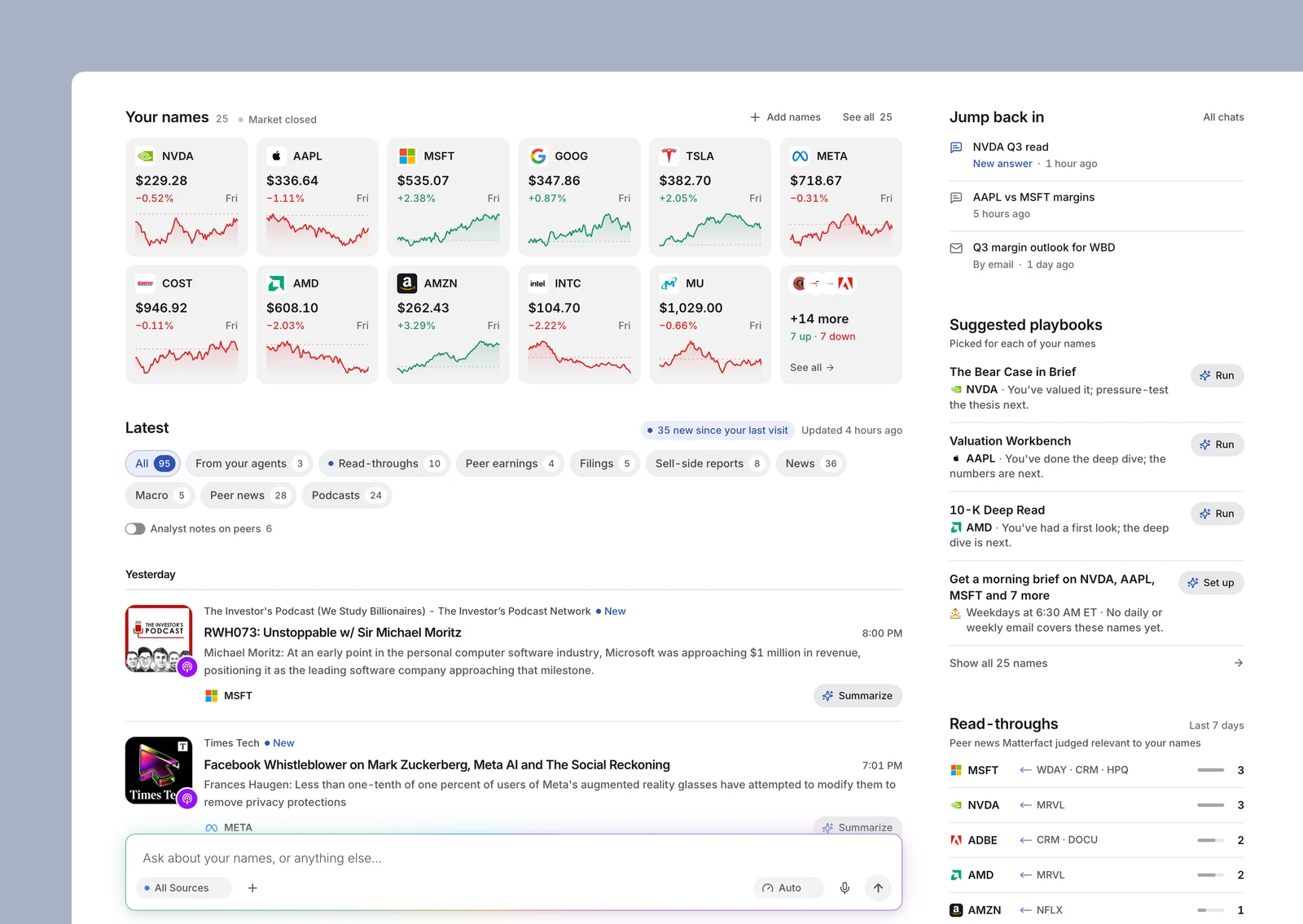
Note: Example names, prices and stories, for illustration.
Source: Matterfact For You
On a new account, with no work to learn from yet, For You asks what you cover. Search for a company, paste a column of tickers from Excel or a Bloomberg screen, or start from a list such as Semiconductors or Big Banks and trim it. Each name appears as a live tile before you save, and Build my page does the rest (Exhibit 2).
Exhibit 2
On a new account, one starter list adds ten names, each a live tile before anything is saved.
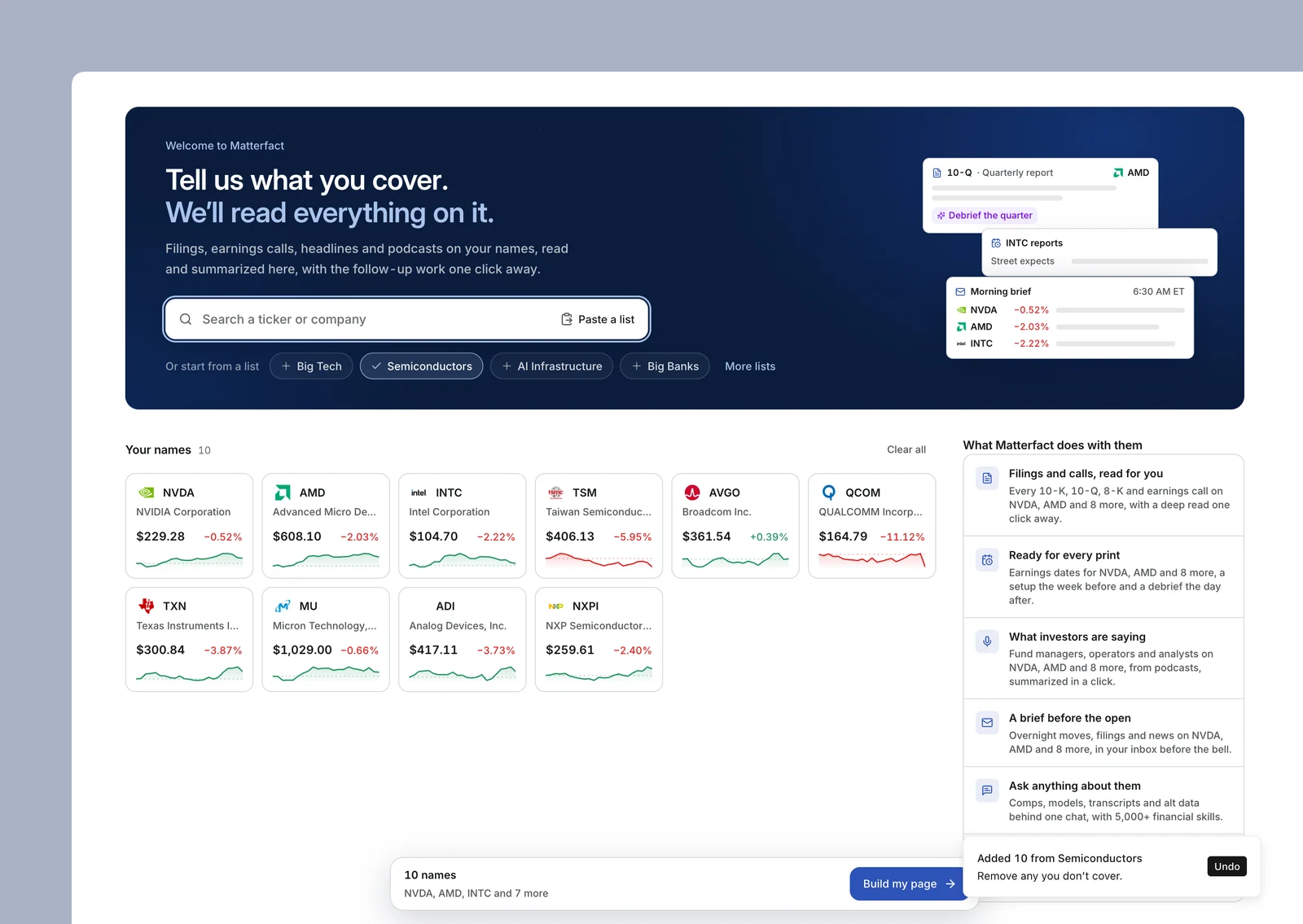
Note: Example prices, for illustration.
Source: Matterfact For You
Filings, news, podcasts and research land in one feed
Below your names, For You merges its sources into a single feed, newest first and grouped by day. Each source also has its own tab (Exhibit 3).
Exhibit 3
One feed covers nine kinds of material on your names and the companies around them.
| Tab | What it shows | Where it comes from |
|---|---|---|
| From your agents | The latest result worth reading from each of your scheduled tasks; routine notices are left out | Your scheduled tasks in Matterfact |
| Read-throughs | News on your names' competitors, suppliers and customers that Matterfact judged relevant to them | TheFly and MT Newswires, judged for each of your names |
| Peer earnings | Quarterly results from your names' competitors, suppliers and customers | Earnings calendar, call transcripts and SEC filings |
| Filings | 10-Ks, 10-Qs, 8-Ks, earnings call transcripts and presentations | SEC EDGAR and earnings call transcripts |
| Sell-side reports | Broker research on your names, filed by name, with the report type and attachments | Your connected Outlook inbox |
| News | Headlines on your names, with rewrites of the same story folded into one | TheFly and MT Newswires |
| Macro | Economic data, the Fed, trade and policy, when they move the whole market or hit your names harder than most | TheFly |
| Peer news | The rest of your peers' news, ranked by how material it is | TheFly and MT Newswires |
| Podcasts | Episodes in which investors and operators discussed your names, with the line that mentions them | Matterfact's podcast index |
Source: Matterfact For You
Three details keep one feed from becoming another inbox:
- Every row says why it is there. "On your watchlist", "You pinned it", or the path a read-through travelled: "Read-through for NVDA · from Marvell Technology, a competitor". A macro story names the names it reaches: "Market-wide · Fed · especially SCHW".
- It marks what is new. The feed counts what arrived since your last visit, marks each new row and adds fresh items at the top without moving what you are reading.
- It keeps the sources in balance. The All view takes a set number of rows from each source per week, so a busy week of podcasts never buries a 10-Q. Each tab shows everything, and scrolling loads older weeks, back 90 days.
For You also follows the companies around your names
A ticker filter stops at your names. For You goes one link further, to each name's competitors, suppliers and customers, using Matterfact's map of who sells to whom.
Read-throughs. When one of those companies makes news, Matterfact judges the story separately for each of your names it might touch, and files it under a name only if it matters to that name. The row leads with the path the story took and offers the question you would ask next, such as "What does this mean for NVDA?" (Exhibit 4). Everything else waits on the Peer news tab, ranked by how material it is. Rating and price-target notes on peers stay out of the way unless you turn on Analyst notes on peers; notes on your own names always show.
Exhibit 4
Each read-through names the company in the news, how it connects to yours and the question to ask next.
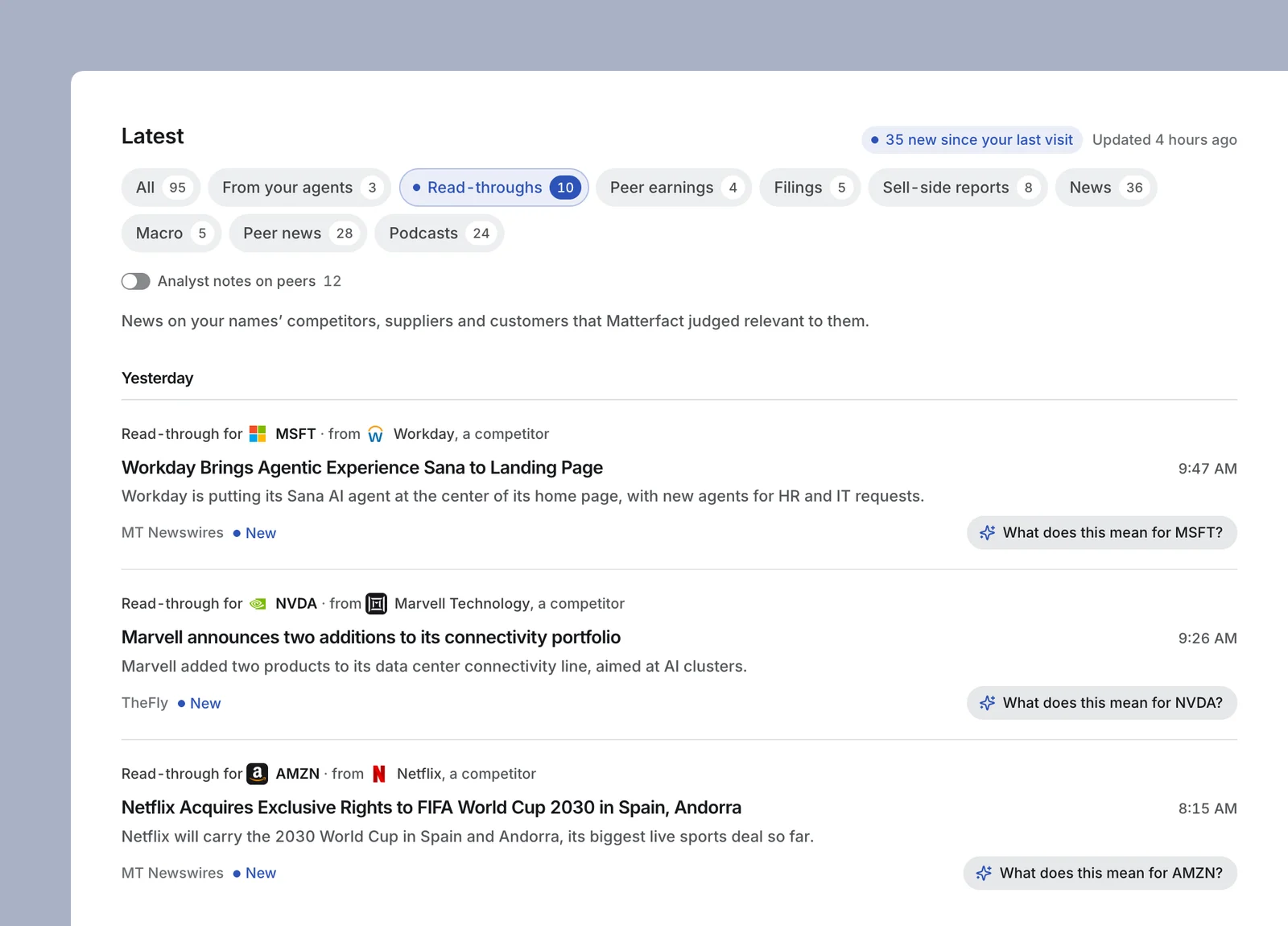
Note: Example stories, for illustration.
Source: Matterfact For You
Peer earnings. When a competitor, supplier or customer reports, the print is filed under the names it bears on. An analyst who covers Costco and Walmart sees PepsiCo's quarter as "Peer earnings · supplier of COST and WMT", with "What does this mean for COST?", "And for WMT?" and "Summarize the call" ready to run, and the transcript, 8-K, 10-Q and presentation underneath.
We explain how read-throughs are judged, across eight channels and four grades of materiality, in Introducing News Read-Throughs.
Every row comes with the next piece of work
Tracking pays off only if the follow-up is quick. For You attaches up to four playbooks to each filing or call, already set up for that name, so the follow-up runs in one click with no form to fill in (Exhibit 5).
Exhibit 5
Each filing arrives with up to four playbooks already set up for that name, one click from running.
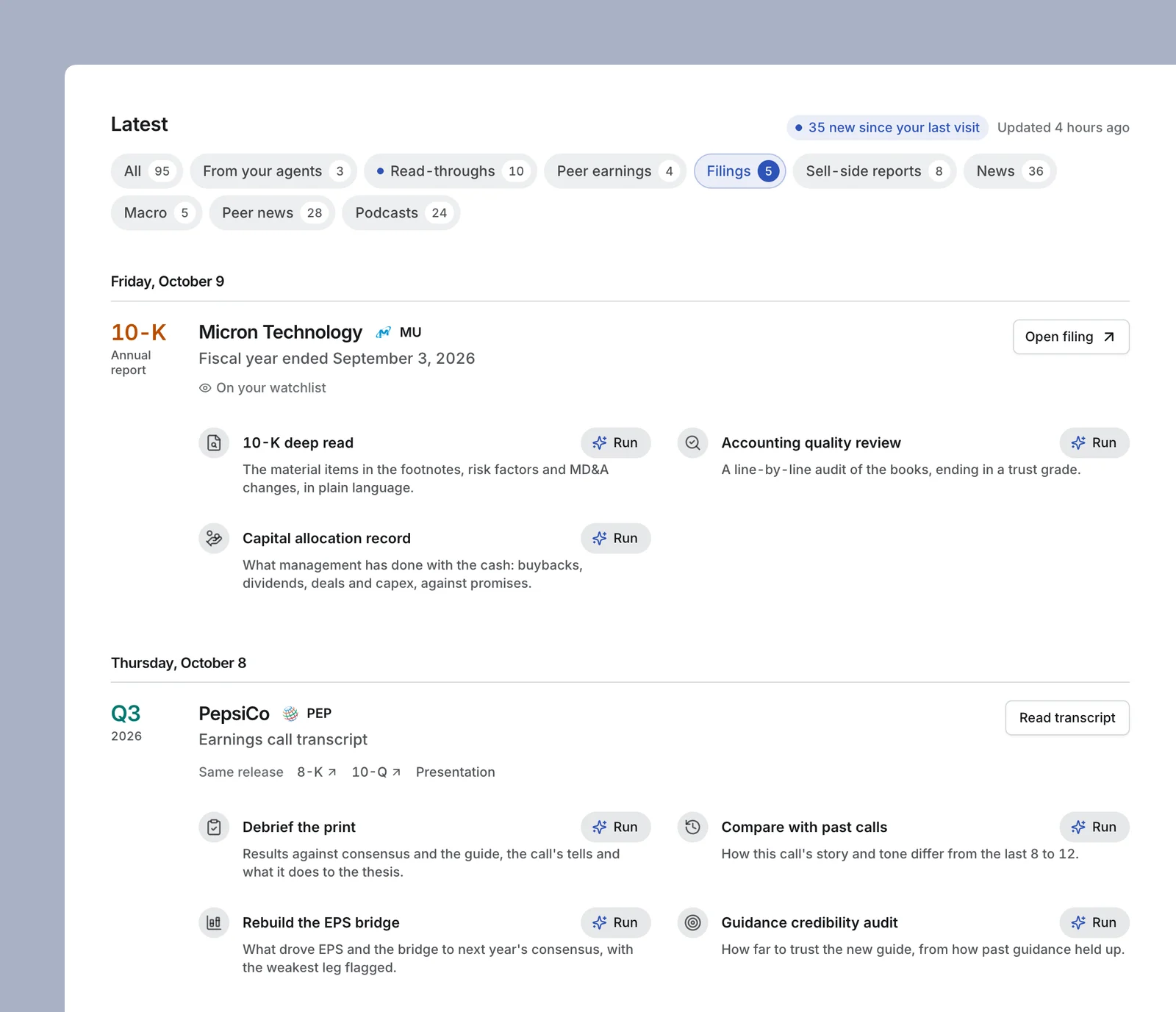
Note: Example filings, for illustration.
Source: Matterfact For You
The playbooks follow what was filed, down to the subject of an 8-K and the company's sector (Exhibit 6). A playbook you already ran on that name in the last 30 days is left out.
Exhibit 6
The playbook follows the filing: a CFO change gets a leadership read, an acquisition gets a deal model.
| When this is filed | For You offers, in one click |
|---|---|
| An earnings call, release or presentation | A debrief of the print, a comparison with past calls and a guidance credibility audit; for a bank, a net interest income bridge; for a software company, a billings and RPO check |
| A 10-Q on its own | An earnings quality check and a balance sheet and debt review |
| A 10-K | A 10-K deep read, an accounting quality review and the capital allocation record; for energy, mining and pharma names, a drilling inventory, reserves or drug pricing review |
| A proxy statement | Vote preparation, an executive pay audit and a board review |
| An 8-K on a CEO or CFO change | A read on the leadership change and on the bench below it |
| An 8-K on an acquisition | A model of what the deal does to earnings and the balance sheet |
| An 8-K on new debt or an equity raise | A balance sheet and debt review |
| An 8-K on an auditor change or a restatement | An accounting quality review and a sweep for management red flags |
| Any of these, on a day the stock makes an unusual move | Why did it move? |
Note: An unusual move is at least 3 percent and at least two standard deviations of the stock's recent daily moves. On an earnings print, analysts already modeling the name are also offered an EPS bridge.
Source: Matterfact For You
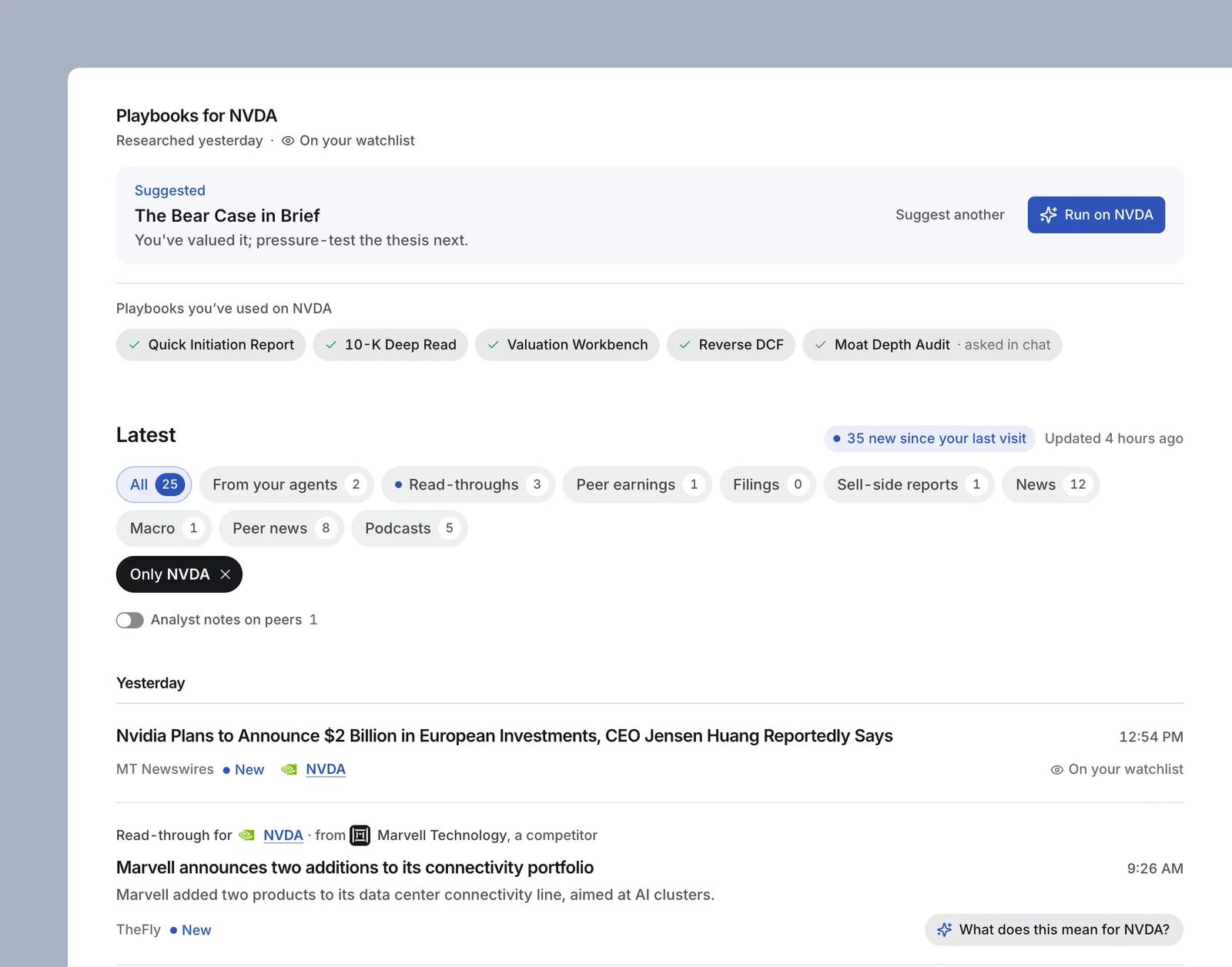
For You also suggests a next step for each name, based on how far your research on it has gone. A name you have only had a first look at gets a deep dive; one you have valued gets a stress test: "You've valued it; pressure-test the thesis next." Click a name and the page narrows to it: the playbooks you have already run on it, the one to run next, and every source filtered to that name (Exhibit 7).
Exhibit 7
With NVDA picked, the feed narrows to its 25 items, beside the five playbooks already run and the one to run next.
Note: Example research history and stories, for illustration.
Source: Matterfact For You
When no playbook fits, ask. The question box at the bottom of the page takes any question about your names, with Matterfact's 5,000+ skills and 400+ playbooks behind it.
For You follows an analyst's day, from the open to the print
Before the open, read what changed. Open Home. The feed shows how much is new since your last visit, and the overnight filings, broker notes and peer news are already sorted under your names. If you would rather read it in email, the morning brief sends your names' overnight moves, filings and news at 6:30 AM ET every weekday. If a name isn't in any daily or weekly email yet, For You offers to set one up.
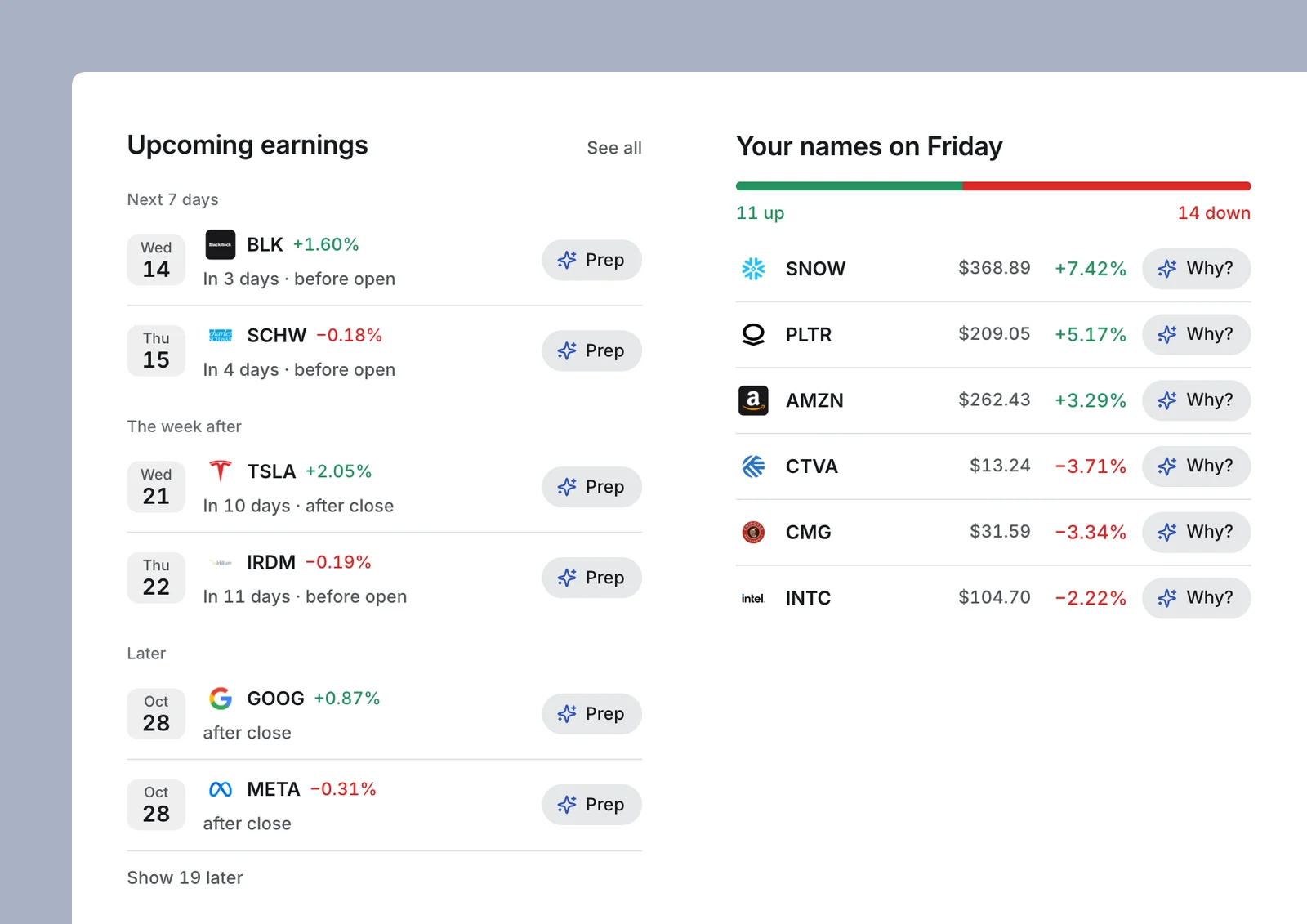
During the session, ask why. The right-hand column shows how your names split between up and down and lists the session's biggest movers, each with a Why? button (Exhibit 8). Why? finds what moved the stock that day: its own news, a peer's, a sympathy move or nothing identifiable.
Around a print, prep and debrief. Upcoming earnings lists your names' next prints by week, with Prep beside each: what the Street expects, what to listen for on the call and how the stock has traded around past prints. Once a name reports, the transcript lands in the feed with Debrief the print beside it, and it opens in Matterfact Earnings, where Smart Highlight answers your questions with management's own sentences.
Exhibit 8
Every print on the calendar is a click from prepped, and every big mover a click from explained.
Note: Example names, dates and prices, for illustration.
Source: Matterfact For You
Across the week, look one link out. The Read-throughs panel counts, for each of your names, the read-throughs it received over the last seven days and the companies they came from. Click a name to read them.
Tracking is now the page's job
An analyst's edge comes from judgment: what a print means for the thesis, whether a peer's warning reaches your name, when to act. Tracking is the work that has to happen before any of that, and it is the work that slips first. For You takes it off your list.
For You is live in Matterfact today. Four steps take a few minutes:
- Check your names. Pin the ones you cover, remove any that don't belong, and add the rest with Add names.
- Connect Outlook from the Sell-side reports tab, so the broker research in your inbox is filed under your names.
- Turn on the morning brief from Suggested playbooks, for an email on your names before the open every weekday.
- Put the work you repeat on a schedule. Ask Matterfact to run a brief or a tracker every day or every week, and its results arrive under From your agents.
After that, the page keeps up with your coverage on its own.
FAQ
How does Matterfact For You know which companies I cover?
It reads the work you already do in Matterfact: the companies you ask about in chat, your memories, your watchlists, and the alerts and scheduled tasks you keep running, which count the most. A long conversation about one company counts about once, so a single deep dive does not crowd out the rest of your coverage. New accounts with no history start by searching for names, pasting a list or picking a starter list.
Can I change the names For You tracks?
Yes. Pin the names you cover so they always lead the page (up to 50), add any company with Add names, and remove any name that doesn't belong. A removed name stays removed, however often it comes up in your chats, and your watchlists are left as they are.
What does For You track for each name?
SEC filings and earnings call transcripts, headlines from TheFly and MT Newswires, macro news that reaches your names, podcasts that discuss them, broker research from your connected Outlook inbox and the results of your scheduled tasks. It also tracks the news and earnings of each name's competitors, suppliers and customers, and keeps 90 days of history.
How does For You decide which peer news matters to my names?
Each story about a competitor, supplier or customer is judged separately for every one of your names linked to that company. A story that matters is filed under that name as a read-through, with the path it took and the channel it travels through. The rest waits on the Peer news tab, ranked by how material it is.
Is For You shared with my team?
No. Each analyst's page is built from their own work and their own names, so two analysts on the same team see different pages. Broker research appears only from the mailboxes you can access.
Do I have to set up alerts or keyword filters?
No. For You builds the list from your work and tracks the sources on it. You can still pin, add and remove names, and narrow the page to one name or one source at any time.
Is For You available on mobile?
Yes. On a phone, For You is the Home tab and the first screen after you sign in, with pull to refresh and stories that open full screen.
Footnotes
-
David Hirshleifer, Sonya Seongyeon Lim, and Siew Hong Teoh, "Driven to distraction: Extraneous events and underreaction to earnings news," Journal of Finance, 2009, Volume 64, Number 5, pp. 2289–2325. ↩
-
Matthew Driskill, Marcus P. Kirk, and Jennifer Wu Tucker, "Concurrent earnings announcements and analysts' information production," The Accounting Review, 2020, Volume 95, Number 1, pp. 165–189. ↩